Sign in Join
  • ERP
    • Front Desk
      • Admission Enquiry
      • Convert Admission Enquiry To Admission
      • Alumini List
      • Admission Form
      • Visitors
      • Lost & Found
      • Feedback
      • Postal Dispatch
      • Postal Receive
      • Admission Insights
    • Student
      • Standards
      • Student Group
      • Student I.D Cards
      • Section
      • Bulk Edit
      • Transfer Certificate
      • Bonafide Certificate
      • Character Certificate
      • Assign Subject Teacher
      • Streams
      • Student Insights
    • HR
      • Staff I.D Cards
      • Designation
      • Add Leave Types
      • Add Staff
      • Assign Class Teacher
      • Employee Insights
      • Attendance
        • Student Attendance
        • Attendance Insights
    • Communication
      • Send SMS Students
      • Send SMS Teachers
      • Conversation
      • Homework
      • Circular
      • Event List
      • Noticeboard
    • Examination
      • Exam Setting
      • Mark Entries
      • Generate Report Card
      • Generate Admit Card
      • Daily Test
      • Exam Insights
    • Account
      • Extra Income
      • Expense
      • Payroll
    • Fees
      • Setup Fees
      • Carry Forward Fees
      • Due Fees Report
      • Demand Bill
      • Fees Insights
    • Transport
      • Setup Transport
        • Assign Transport Fees
    • Other
      • Timetable
      • Inventory
      • Library
      • Hostel
      • Setting
  • Teacher Login
    • Teacher Profile
  • Student Login
  • Enhancements
  • Data Setup
Sign in
Welcome!Log into your account
Forgot your password?
Create an account
Sign up
Welcome!Register for an account
A password will be e-mailed to you.
Password recovery
Recover your password
Search
EduChanger's ERP Help Modern IT Solutions for Education
  • ERP
    • Front Desk
      • Admission Enquiry
      • Convert Admission Enquiry To Admission
      • Alumini List
      • Admission Form
      • Visitors
      • Lost & Found
      • Feedback
      • Postal Dispatch
      • Postal Receive
      • Admission Insights
    • Student
      • Standards
      • Student Group
      • Student I.D Cards
      • Section
      • Bulk Edit
      • Transfer Certificate
      • Bonafide Certificate
      • Character Certificate
      • Assign Subject Teacher
      • Streams
      • Student Insights
    • HR
      • Staff I.D Cards
      • Designation
      • Add Leave Types
      • Add Staff
      • Assign Class Teacher
      • Employee Insights
      • Attendance
        • Student Attendance
        • Attendance Insights
    • Communication
      • Send SMS Students
      • Send SMS Teachers
      • Conversation
      • Homework
      • Circular
      • Event List
      • Noticeboard
    • Examination
      • Exam Setting
      • Mark Entries
      • Generate Report Card
      • Generate Admit Card
      • Daily Test
      • Exam Insights
    • Account
      • Extra Income
      • Expense
      • Payroll
    • Fees
      • Setup Fees
      • Carry Forward Fees
      • Due Fees Report
      • Demand Bill
      • Fees Insights
    • Transport
      • Setup Transport
        • Assign Transport Fees
    • Other
      • Timetable
      • Inventory
      • Library
      • Hostel
      • Setting
  • Teacher Login
    • Teacher Profile
  • Student Login
  • Enhancements
  • Data Setup
Home Student Login Student Fees
  • Student Login

Student Fees

By
Admin
-
June 6, 2025
0
22
Facebook
Twitter
Pinterest
WhatsApp

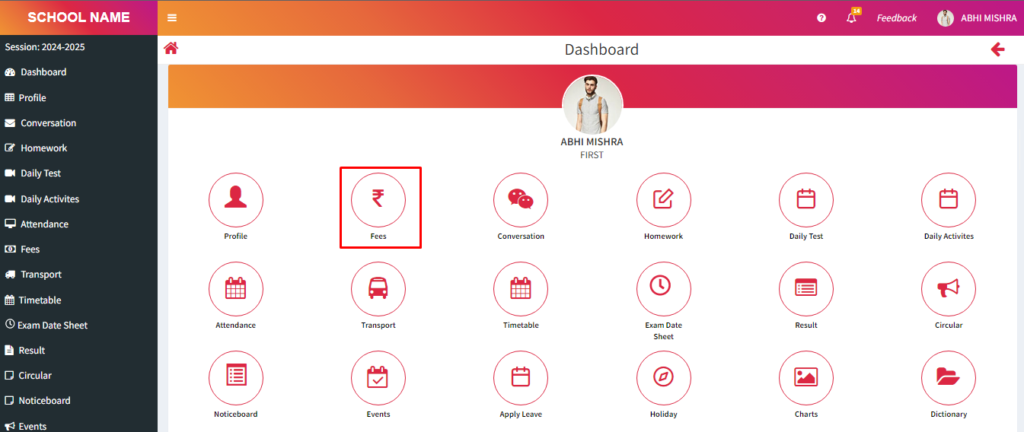
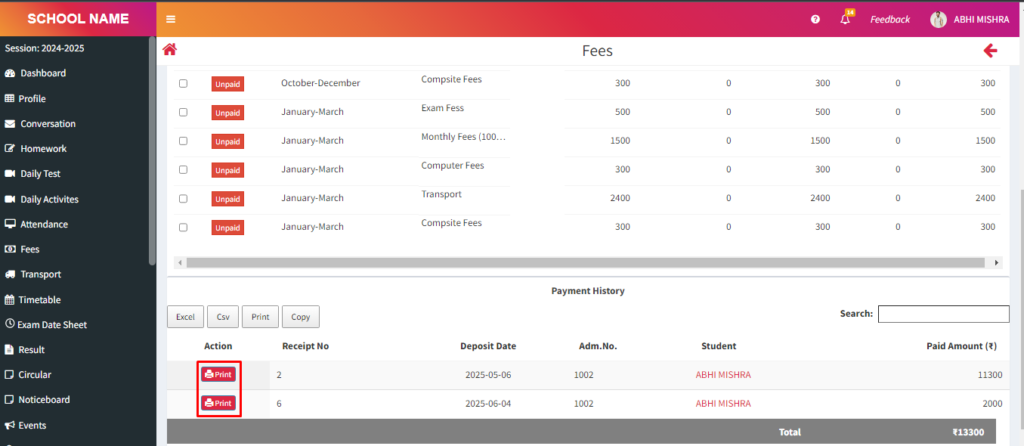
    > From here students will see fees status.

    > Follow these steps:

    1. Click on Fees.
    2. From here students can check the status of their fees and print the receipt.
    Facebook
    Twitter
    Pinterest
    WhatsApp
      Previous articleStudent Profile
      Next articleStudents Conversation
      Admin
      Admin
      https://educhanger.com/help
      Educhanger.com